Introduction
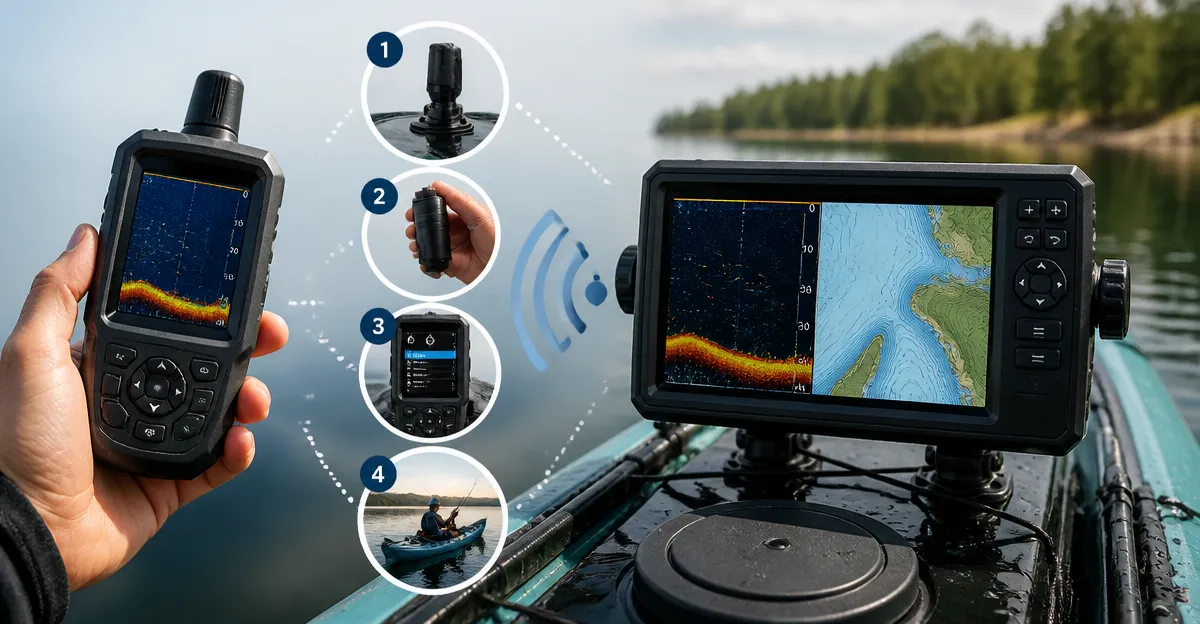
This guide explains how one can pair a handheld sonar device with a kayak‑mounted chartplotter, enabling real‑time fish location and precise navigation. By following the step‑by‑step instructions, the reader will learn how to install hardware, establish a wireless link, configure sonar settings and resolve common issues. The result is a more efficient fishing experience that saves time, reduces guesswork and increases catch rates.
What You’ll Need
- Garmin ECHOMAP UHD2 53CV – 5‑inch chartplotter with CHIRP and ClearVü sonar, $449.99, rating 4.5/5 (88 reviews).
- Garmin Striker Cast – Castable sonar that streams to a smartphone, $139.99, rating 4.4/5 (507 reviews).
- LUCKY Wireless Fish Finder – Portable sonar with 853 ft range, $133.99, rating 4.4/5 (78 reviews).
- Smartphone or tablet running iOS or Android (for the Striker Cast app).
- Power source for the chartplotter (12 V kayak battery or portable power bank).
- Water‑proof mounting brackets or zip‑ties for securing the transducer.
- USB‑type charging cable (included with handheld devices).
Step 1: Mount the Chartplotter on the Kayak
Begin by selecting a stable location on the kayak deck where the 5‑inch display will remain visible yet protected from spray. The Garmin ECHOMAP UHD2 53CV includes a tilt‑mount that can be attached with marine‑grade screws or zip‑ties. Secure the mount, then attach the chartplotter, ensuring the power cable reaches the battery compartment. The device draws approximately 0.23 A at 12 V, which is modest for a kayak power system. Once mounted, turn on the unit and verify that the pre‑loaded LakeVü and BlueChart maps load correctly. This step establishes a reliable navigation base for later pairing.
Step 2: Attach the Handheld Sonar Transducer
Both the Garmin Striker Cast and the LUCKY Wireless Fish Finder use detachable transducers that float on the water surface. Tie the provided safety tether to a sturdy fishing line, then cast the sensor from the kayak bow or side. For the Striker Cast, the sensor will automatically power on when it contacts water, conserving battery life. The LUCKY unit offers an 853 ft operation distance, making it suitable for deep‑water scouting from a shallow kayak. Position the transducer within a few feet of the kayak hull to maintain a stable Bluetooth or Wi‑Fi link.
Step 3: Establish the Wireless Connection
Open the Striker Cast app on the smartphone and follow the on‑screen pairing instructions. The app searches for the sonar’s Bluetooth Low Energy signal and, once detected, prompts the user to confirm the connection. After pairing, the app displays a live 2‑D sonar view and optional flasher mode for ice fishing. If the LUCKY finder is preferred, press its power button to activate the built‑in Wi‑Fi hotspot, then connect the smartphone to the network named “LUCKY‑FishFinder”. Launch the companion LUCKY app (available in both app stores) and select the sensor from the device list. Both methods provide real‑time fish echoes that can be overlaid on the chartplotter via NMEA 0183 data.
Step 4: Configure NMEA Data Sharing
To send sonar data from the handheld device to the Garmin ECHOMAP UHD2 53CV, enable NMEA output in the handheld app’s settings. Set the transmission rate to 4800 bps, which the chartplotter accepts without latency. On the chartplotter, navigate to Settings → Connectivity → NMEA Input and enable the appropriate port (usually “Port 1”). Once activated, the sonar icons will appear on the map screen, allowing the angler to see fish locations directly on the navigation display. This integration eliminates the need to glance between two screens and provides a unified view of depth, structure and waypoints.
Step 5: Calibrate Depth and Sonar Gain
After the data link is active, calibrate the sonar depth to match the chartplotter’s bathymetry. Use a known depth marker (such as a dock pilings) and compare the displayed depth on the handheld app with the chartplotter’s reading. Adjust the gain slider in the app until fish arches appear crisp without excessive background noise. The Garmin Striker Cast offers a “CHIRP” mode that sweeps a range of frequencies, improving target separation at depths up to 200 ft. For deeper waters, the LUCKY unit’s 90° beam can scan to 147 ft, providing flexibility for varying lake conditions.
Step 6: Save Waypoints and Create a Fishing Map
With sonar data visible on the chartplotter, identify promising structures such as weed beds, drop‑offs or submerged logs. Press the “Waypoint” button on the Garmin ECHOMAP UHD2 53CV and assign a descriptive name (e.g., “Morning Bass Spot”). The device stores up to 5,000 waypoints, enabling quick return trips. If the user subscribes to Garmin Quickdraw Community, they can download 1‑foot contour maps that further enhance spot memorization. This systematic approach transforms a random day on the water into a data‑driven fishing strategy.
Tips & Pro Tips
- Mount the chartplotter on a vibration‑dampening pad to reduce false sonar echoes caused by kayak movement.
- Keep the smartphone in a waterproof pouch but ensure the antenna is not obstructed; a clear line of sight improves Bluetooth reliability.
- When fishing in cold water, enable the “Ice Flasher” mode on the Striker Cast for a classic vertical view of fish silhouettes.
- Periodically check the transducer’s battery level via the app; the Striker Cast provides a 10‑hour runtime, sufficient for a full day’s outing.
- For extended trips, consider a portable solar charger to maintain both the chartplotter and handheld device power.
Troubleshooting
Problem: Handheld sonar does not appear on the chartplotter.
Solution: Verify that NMEA output is enabled in the handheld app and that the correct baud rate (4800 bps) is selected. Confirm that the chartplotter’s NMEA input port is active. Restart both devices and re‑pair the Bluetooth connection if necessary.
Problem: Sonar display is noisy or shows no fish arches.
Solution: Reduce the gain setting to eliminate surface clutter. Ensure the transducer is fully submerged and not tangled in debris. In shallow water, switch to “Wide Mode” on the Helix 5 or “Standard Mode” on the Striker Cast for broader coverage.
Problem: Battery drains faster than expected.
Solution: The handheld devices automatically power down when removed from water; however, leaving the app open can keep the radio active. Close the app when not actively scanning and store the sensor in a dry place between casts.
Conclusion
By following the six detailed steps, one can successfully pair a handheld sonar with a kayak chartplotter, creating an integrated system that delivers precise fish location, depth information and waypoint management. The combination of a reliable chartplotter such as the Garmin ECHOMAP UHD2 53CV and a castable sonar like the Garmin Striker Cast or LUCKY Wireless Fish Finder empowers anglers to fish smarter, not harder. Continued practice and occasional firmware updates will keep the system performing at its peak.
Products Mentioned in This Guide
Frequently Asked Questions
What steps are required to pair a Garmin Striker Cast handheld sonar with a Garmin ECHOMAP chartplotter on a kayak?
Install the sonar, enable its Bluetooth, open the ECHOMAP’s Sonar Settings, select the Striker Cast from the device list, and confirm the connection.
Can I use a smartphone or tablet instead of a chartplotter to view handheld sonar data?
Yes, the Striker Cast streams directly to its companion app on iOS or Android devices without needing a chartplotter.
What is the typical wireless range for the LUCKY Wireless Fish Finder when paired with a chartplotter?
The LUCKY unit advertises up to 853 ft (260 m) range under optimal conditions.
Do I need any special adapters to connect the handheld sonar’s power cable to my kayak’s battery?
Most handheld sonars use a 12 V lead‑acid or lithium battery and can be powered with a standard marine battery plug or a portable power bank with the appropriate voltage.
How can I troubleshoot a lost connection between the handheld sonar and the chartplotter?
Restart both devices, ensure Bluetooth or Wi‑Fi is enabled, check for firmware updates, and verify that no other wireless devices are causing interference.